
A5 RACK by AWOL AUDIO

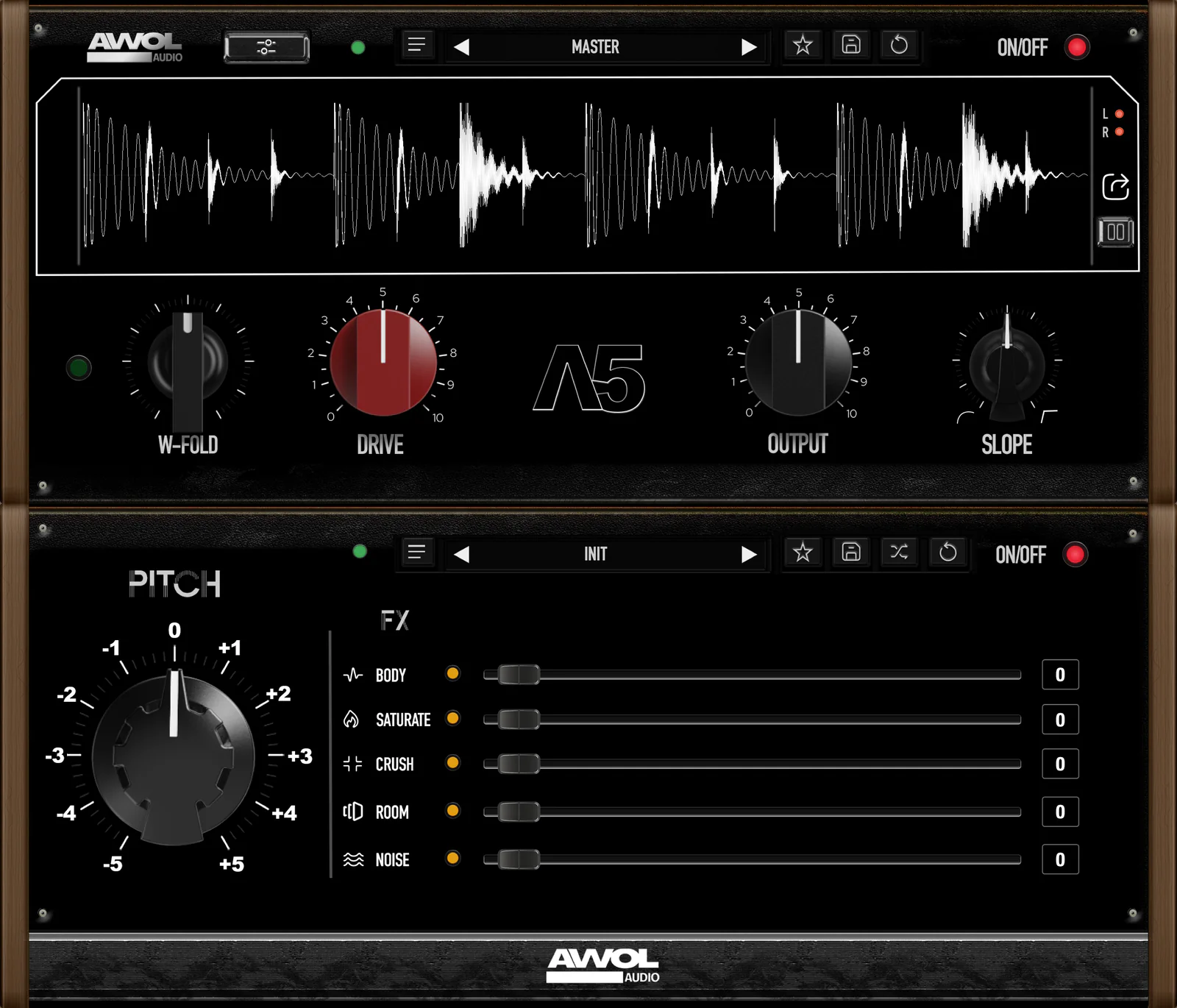
The A5 RACK plug-in. MASTER on top with the waveform display and the W-FOLD, DRIVE, OUTPUT and SLOPE knobs; MOTION below with the PITCH wheel and the BODY, SATURATE, CRUSH, ROOM and NOISE sliders.

A clipper with drum effects built in

MASTER clips and shapes drums, 808s and bass. MOTION adds pitch and five effects on top.

VST3 and AU for Mac. VST3 for Windows.

Hear the difference

Pick a sound, press play, and switch between Dry and A5 while it plays.

0:00 / 0:00

MASTER and MOTION

MASTER sits on top and MOTION underneath. Scroll to look at each one.

The A5 RACK interface: MASTER on top with the W-FOLD, DRIVE, OUTPUT and SLOPE knobs, MOTION below with PITCH and the BODY, SATURATE, CRUSH, ROOM and NOISE sliders.

MASTER

The clipper. DRIVE pushes the signal into it, SLOPE sets the edge of the clip from soft to hard, and OUTPUT sets the level. W-FOLD adds a wavefolder in front.

W-FOLD
Wavefolder, with its own on/off
DRIVE
Level into the clipper
SLOPE
Soft to hard clip
OUTPUT
−24 to +12 dB

MOTION

Pitch and five effects for drums. Start from one of 20 factory scenes or set the modules yourself. Switch the unit off and A5 is a clipper again.

PITCH
−5 to +5 semitones, tempo kept
FX
BODY, SATURATE, CRUSH, ROOM and NOISE
SCENES
20 factory scenes plus INIT
The A5 RACK interface with the controls for the selected sound highlighted.
Highlighted: BODY

Five ways to shape your drums

A5 includes five custom drum effects, each with its own character. More sounds and presets are planned for future updates.

  1. Adds weight and fullness under each hit. BODY builds a low layer from the drum's own low end and blends it in, so thin drums sound bigger while the original hit stays as it is.

  2. Adds harmonics for colour and grit, from warm and rounded to driven, so drums sound thicker and more present.

  3. Lo-fi digital distortion. CRUSH lowers the bit depth and sample rate for a broken, aggressive sound, and a built-in limiter keeps the level under control.

  4. Puts your drums in a room. Short reflections and a natural tail add space and ambience, blended in under the hit so it stays up front.

  5. Adds movement and texture: phaser, flanger, metallic or vocal-like tones on each hit. It doesn't add hiss, and it leaves the low end below 200 Hz untouched.

20 factory scenes plus INIT. Each one sets all five MOTION modules as a starting point.

See the rack

The plug-in's own interface. Select a number, or step through, to see what each control does.

The full A5 RACK interface with 14 numbered markers: 1 to 6 on the MASTER unit, 7 to 14 on the MOTION unit.

MASTER

4DRIVE

How hard the signal is pushed into the clipper. Higher settings give more loudness and density.

4 of 14
  1. Presets Load, step through, save and reset MASTER presets. A5 opens on the MASTER factory preset.
  2. Display A live waveform of what comes out of A5. Pause it, select a passage and drag it into your DAW as a WAV.
  3. W-FOLD A wavefolder in front of the clipper. It folds the waveform back on itself before it is clipped, and has its own on/off switch.
  4. DRIVE How hard the signal is pushed into the clipper. Higher settings give more loudness and density.
  5. OUTPUT The level coming out of MASTER, from −24 to +12 dB.
  6. SLOPE The shape of the clipping curve, from a soft knee to a hard edge.
  7. Scenes Load one of 20 factory scenes or INIT. The arrows step through them, and SHUFFLE picks one.
  8. ON/OFF Switches the whole MOTION unit in or out. With it off, A5 is the MASTER clipper on its own.
  9. PITCH Shifts the pitch from −5 to +5 semitones without changing the tempo.
  10. BODY Adds low end and texture under each hit, and leaves the dry signal alone.
  11. SATURATE Adds harmonic saturation.
  12. CRUSH Digital degradation: bit and sample-rate reduction, filtered and limited so it stays usable.
  13. ROOM Early reflections and a diffuse tail, blended in as a send so the dry hit stays in front.
  14. NOISE A moving phaser, flanger, comb or formant texture, kept above 200 Hz so the low end stays clean.

Open the full-size interface image

Select your audio and drag it out

A5's display can hand you the sound it just made. Freeze it, select a hit or a phrase, and drop it into your DAW as a WAV.

A5's waveform display, paused, with one drum hit selected in grey. The drag icon and the PAUSE button are on the right edge of the display.
The paused display with the selection, the PAUSE button and the drag icon marked.
  1. Pause Press PAUSE to freeze the last two seconds of the display.
  2. Select Drag across the waveform to select a hit or a passage.
  3. Drag it out Drag from the drag icon into your DAW. It lands as a WAV file; with nothing selected, the whole frozen window goes.

What's included

Plug-in and presets
One A5-RACK plug-in, one MASTER preset and 20 MOTION presets. More presets and improvements are planned.
Formats & system
Mac: VST3 and AU, macOS 15.5 or later on Apple Silicon. Windows: VST3, Windows 10 or 11 (64-bit) on an Intel or AMD PC.
Delivery
Download and licence key by email after checkout.
Activation
Paste the key into A5 once, online. It works offline after that. Two computers per licence.

A5 RACK

Mac: VST3 and AU, macOS 15.5 or later on Apple Silicon. Windows: VST3, Windows 10 or 11, 64-bit.

Get A5

Have a waitlist code?

  1. Find the code in your waitlist email.
  2. Click Get A5.
  3. Enter the code in the discount field at checkout, using the email address you joined the waitlist with.

Questions before or after buying: support@awol.audio

A5 RACK plug-in interface.

Questions

Anything else: support@awol.audio

What does A5 do?

A5 is a plug-in that helps your drums, 808s and bass hit harder and lets you shape their sound. It combines a clipper (MASTER) with pitch and five drum effects (MOTION), so you can add punch, distortion, space and texture without switching between several plug-ins.

Does it work with my DAW?

On Mac, A5 is a VST3 and AU plug-in, so it runs in DAWs that load either format. On Windows it is a 64-bit VST3 plug-in, so it needs a 64-bit DAW that loads VST3. It works on mono and stereo tracks. On Mac it has been tested in FL Studio (VST3 and AU) and passes Apple's AU validation. There is no AAX version, so it does not run in Pro Tools.

What formats and systems are supported?

Mac: VST3 and AU, on Apple Silicon Macs (M1 or newer) running macOS 15.5 or later.

Windows: VST3, on a 64-bit Intel or AMD PC with Windows 10 or 11 (64-bit), in a 64-bit DAW. Windows on Arm and Intel Macs are not supported.

How do I receive my download?

After checkout you get an email with your download and your licence key.

How do I activate my licence?

Open A5, paste the key from your order email and press ACTIVATE. It needs an internet connection once. After that it works offline, with no account or password.

Can I use it on more than one computer?

Yes. One key activates A5 on two computers, Mac or Windows in any mix. Activating the same computer again doesn't use up a second one. To move A5 to a new computer, email support.

How do I use my waitlist discount code?

Your code arrives by email. Click Get A5, then enter the code in the discount field at checkout. It's applied there, so there's nothing to enter on this page. Check out with the email address you joined the waitlist with.

Can I resize the window?

Yes. The interface scales from 75 % to 200 %.

Preview

Checkout opens at launch

At launch, Get A5 goes straight to Shopify checkout for A5 RACK. Waitlist codes are entered there.
